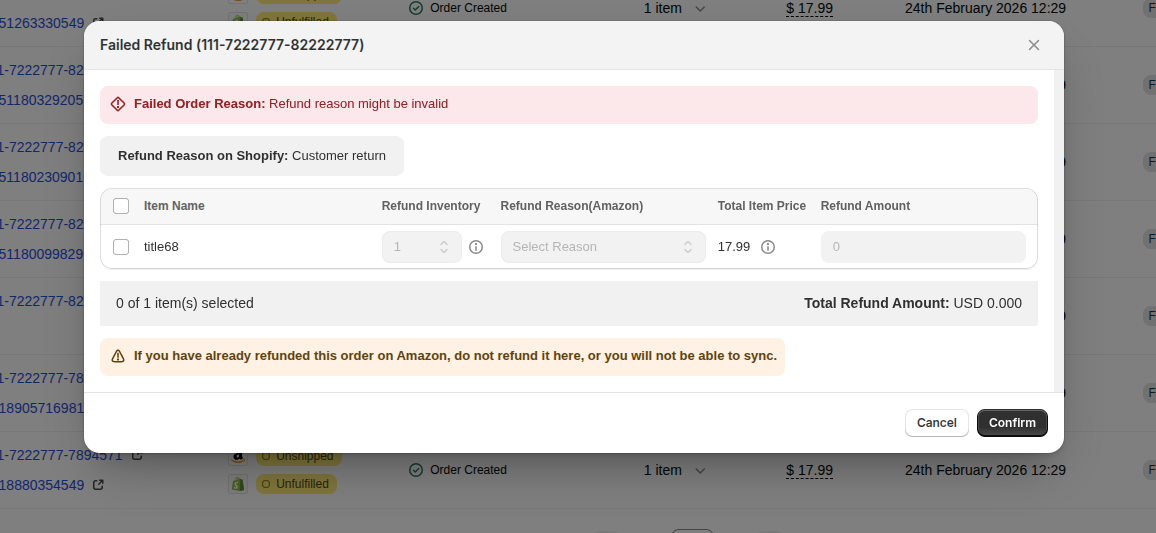
Refund failed: refund amount or scope is wrong
A refund will be rejected by Amazon when the amount or scope of the refund doesn't match what the original Amazon order can support. These are the three most common amount-related rejections.
1. The refund amount is more than the original order
If the Shopify refund total is greater than what Amazon originally captured for that line, Amazon refuses the refund. Common causes:
- The line item's price in Shopify changed between the order being placed and the refund being issued.
- A manual refund on Shopify was set to an amount higher than the line's actual paid total.
- Tip / gratuity that exists on Shopify but not on the Amazon order was included.
2. You're trying to refund an item that's already been refunded on Amazon
Each line item on Amazon can only be refunded once. If you (or a buyer-initiated A-to-z claim) has already refunded a line, a second Shopify-side refund on that same line will be rejected.
If the item is already showing as refunded in Seller Central, no further action is needed — it's already done on Amazon.
3. Duplicate tax or shipping refund
Amazon treats tax and shipping as separate, one-shot refundable buckets. If the original order's tax or shipping has already been refunded once on Amazon, a follow-up refund that includes tax or shipping again will be rejected.
Fix it
On the Orders page, find the row with the Failed Refund status and click on Failed Refund. The Failed Refund dialog opens.
In the dialog:
- Refund Inventory — set the correct quantity to refund.
- Refund Reason (Amazon) — pick a valid Amazon reason from the dropdown.
- Refund Amount — adjust to an amount Amazon will accept (at or below the line's paid total, excluding any tax or shipping that's already been refunded).
Click Confirm to retry the refund.