How can I export unlinked products?
You can export unlinked products directly from the app.
Simply click on the three dots (⋮) menu and select Export.
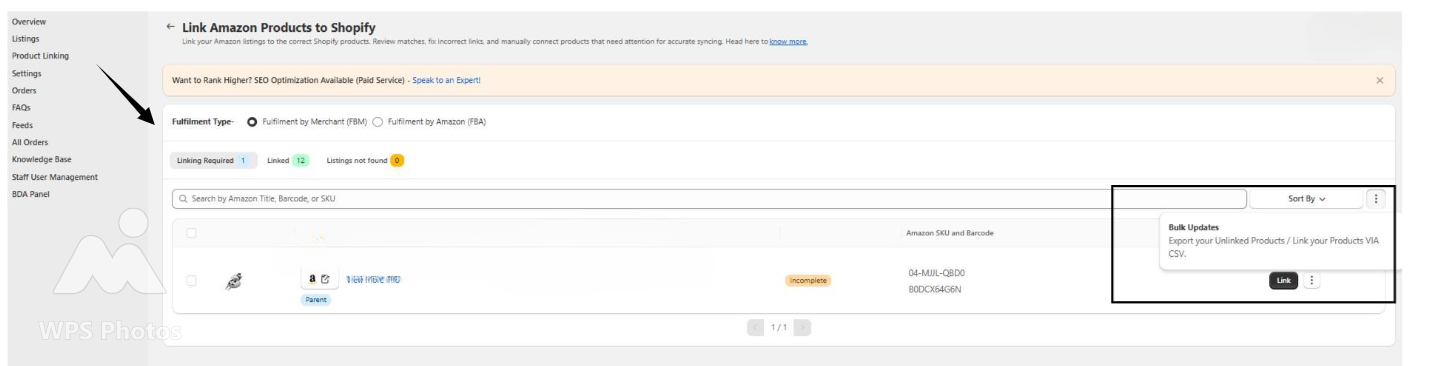
This will download a file containing all unlinked products for your review.
Related Articles
How to Initiate Bulk Updates of Shopify Products?
How to Initiate Bulk Updates of Shopify Products The Bulk Update feature allows you to efficiently update multiple product details using a CSV file. You can export product data—including titles, descriptions, inventory, prices, and SKUs—make ...
I’m selling liquid products with different sizes, but they’re not showing as one grouped listing on Amazon. Why?
For liquid items, Amazon needs extra details to group the variants accurately. In the app, make sure you’ve mapped both Unit Count and Liquid Volume from your Shopify product. You can do this by: Going to the product section in the app. Once you’re ...
Do you support Bundle Products?
Yes, we now support importing Bundle Products into the app based on custom requirements. If you have bundle products that need to be configured, simply share the requirement with us, and our team will enable it for you accordingly. You can reach out ...
How To List Variant Products on Amazon?
How To List Variant Products on Amazon? If you have product variants listed on Shopify and wish to upload the same on Amazon, you can follow these steps to upload variant products via the app: Scroll to the “Not Listed” aisle in the listing section ...
How can I upload bulk products using the Template method?
You can upload bulk products using the Template method by following these steps: You can upload bulk products using the Template method by following these steps: First, navigate to the Settings section. From there, click on "Templates." Next, select ...