Order failed: SKU/product not found

Order failed: SKU/product not found

When an Amazon order lands in the Errors tab and you click on Failed Order, the dialog shows the failure reason. A "product not found" reason has two flavours, distinguishable by what you see in the dialog.

1. "No products found" with the red banner — the SKU doesn't exist in the app

If you see a red No products found banner inside the Failed Order dialog, the SKU on the Amazon order doesn't exist in the app at all. Most commonly this means:

  • The product was deleted from Amazon (the listing is gone), or
  • A product delete was initiated for it from the app.
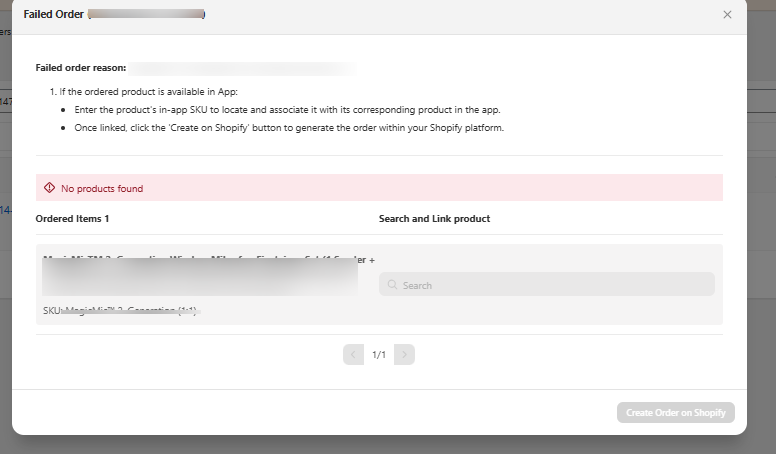
Failed Order dialog showing No products found in a red banner

Restore the Amazon product; otherwise the failed order can't be auto-resolved.

2. No red banner — the product exists but isn't linked

If the dialog shows "Failed order reason: SKU***:product not found" but without the red "No products found" banner, the SKU exists in the app — it's just not linked to a Shopify product yet.
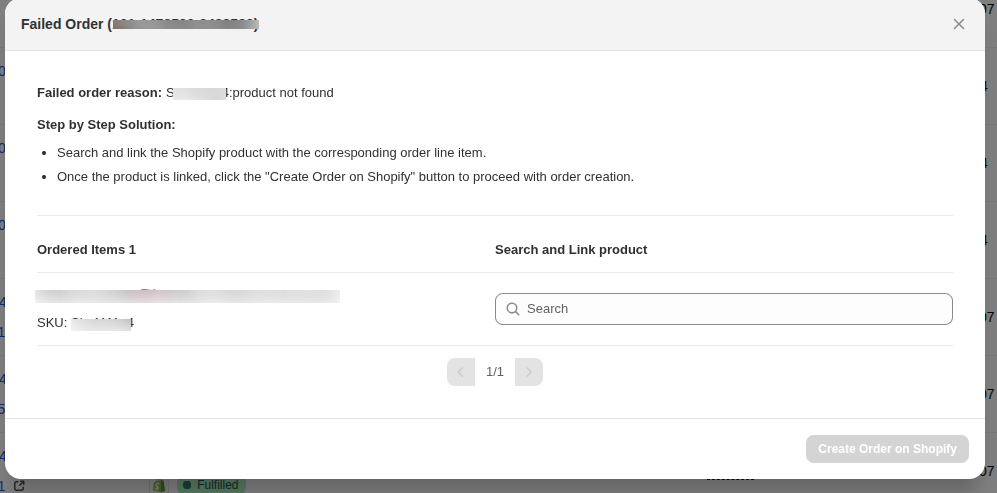
You have two options.

Option A — link the product manually

In the Failed Order dialog, use the Search field on the right to find the Shopify product and link it. Then click Create Order on Shopify to retry the order creation.

Option B — auto-sync orders for not-yet-linked products

If you don't want to link the products and would still like Amazon orders for them to flow into Shopify, enable this setting:

Settings → Order Settings → Order → Sync Amazon orders for not-linked products

By enabling this, you ensure that orders placed on Amazon for products that require linking in the app are also synced to Shopify.

    • Related Articles

    • Onboarding the CedCommerce Amazon Channel

      Onboarding Welcome to the CedCommerce Amazon Channel App onboarding process! This guide will help you install the app in your Shopify store and integrate it with your Amazon account. To ensure a successful start, have the following prerequisites ...
    • Refund failed: SKU mismatch after unlink or re-link

      If the SKU on the Amazon order's line doesn't match the SKU currently linked between your Shopify product and the Amazon listing, the refund can't be matched back to a line on Amazon, and Amazon rejects it. Why it happens Each Amazon order line is ...
    • Order failed: Unable to claim / reserve inventory

      If a Failed Order's reason reads "Unable to claim inventory" or "Unable to reserve Inventory", Shopify rejected the order because it couldn't allocate stock for one of the SKUs. There are two common causes. 1. The SKU has no inventory in Shopify The ...
    • Link Amazon Products under Linking Required to Shopify products

      Sync Status cannot auto-link an Amazon listing to a Shopify product when their SKU and barcode don't match. Such listings stay under Linking Required in the Product Linking section, and you can pair them with the right Shopify product yourself using ...
    • Getting Started with CedCommerce Amazon Channel

      Welcome to the CedCommerce Amazon Channel App! Effortlessly manage your Amazon business from Shopify with a single, integrated solution. The CedCommerce Amazon Channel App allows sellers to connect multiple Amazon Seller Accounts in one place, ...